When managing a Kubernetes cluster, securely handling secrets is a top priority. Secrets contain sensitive data like passwords, API keys, and other credentials that must be properly managed. A cluster without secrets management is not very useful. Kubernetes offers its own secrets management capabilities, but it has limitations, and we don’t want to risk pushing secrets into version control.
As part of my basic stack (everything I want when deploying a cluster), I deploy External Secrets Operator (ESO), which allows automatic syncing of secrets from a secret manager to your cluster. Since it’s part of my basic stack, I integrate it with Terraform, and I highly recommend doing so (more on why later). However, you can also set it up via the command line. I am using AWS for this example, but you can deploy your cluster anywhere—the principle remains the same. Additionally, External Secrets Operator (ESO) can be used with various providers.
Overview
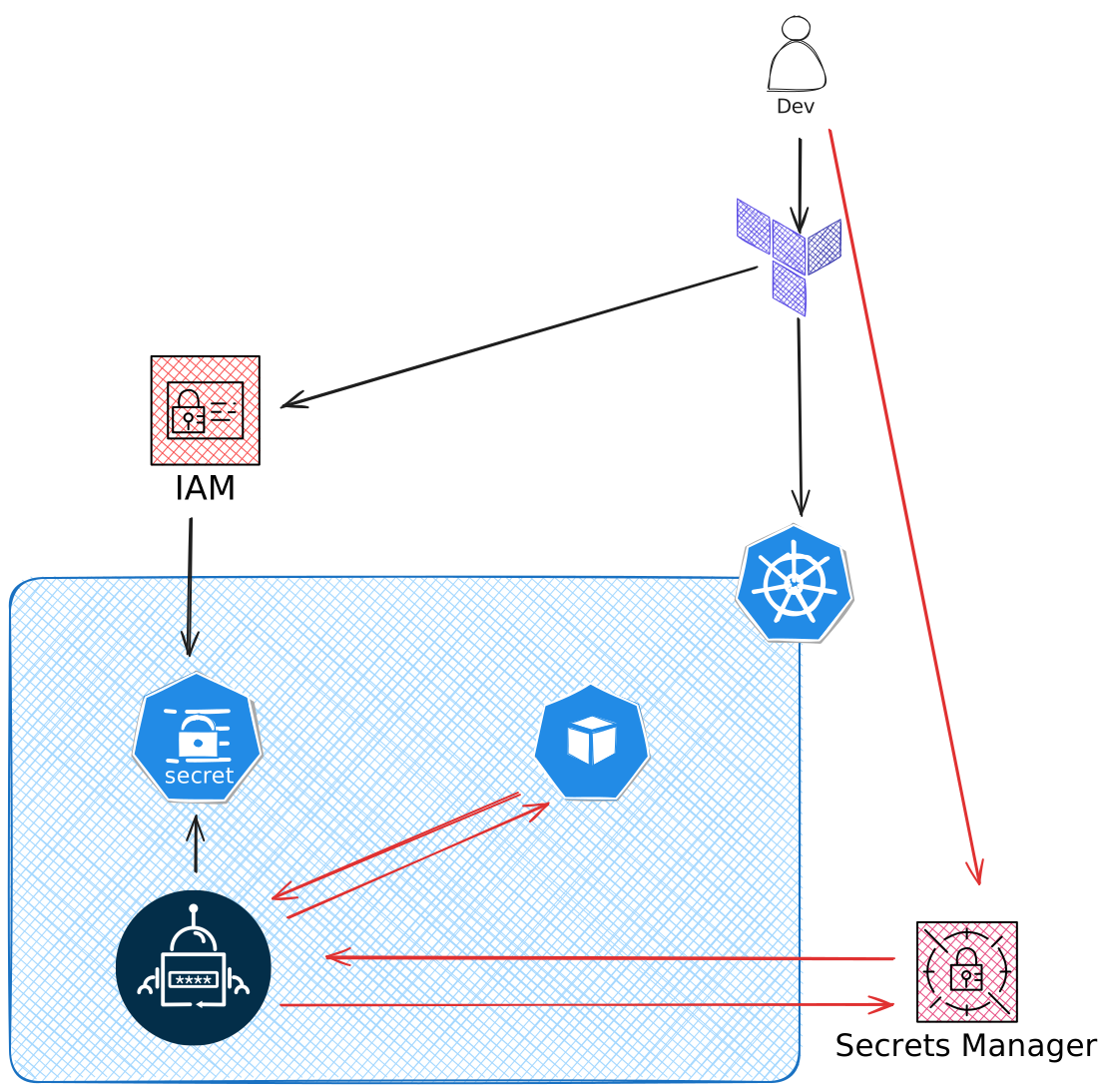
Resources Breakdown
I create an IAM user with read-only access to AWS Secrets Manager. This IAM user will be used by the External Secrets Operator to authenticate and retrieve secrets.
Here’s how the policy should look:
data "aws_iam_policy_document" "secrets_read_only_policy" {
  statement {
    actions = [
      "secretsmanager:GetSecretValue",
      "secretsmanager:DescribeSecret",
      "secretsmanager:ListSecrets",
      "secretsmanager:ListSecretVersionIds"
    ]
    resources = ["arn:aws:secretsmanager:*:*:secret:*"]
  }
}
Note: You can enhance security by providing the specific ARN for your Secrets Manager.
Once I have the user with the correct permissions and AWS credentials, I add the credentials as a regular secret in Kubernetes:
resource "kubernetes_secret_v1" "user_aws_credentials" {
  metadata {
    name = aws_iam_user.this.name
  }

  data = {
    access-key        = aws_iam_access_key.this.id
    secret-access-key = aws_iam_access_key.this.secret
  }

  type = "Opaque"
}
This is the only secret I need to handle directly. By managing it through Terraform, I ensure that I don’t risk uploading secrets to the wrong place. Plus, since the secret is dynamic, I don’t even know the value myself.
The External Secrets Operator must be installed in your Kubernetes cluster. You can do this via Helm, and once installed, you are ready to go.
How to Use It
With the above setup complete, I can now manage my secrets through an external secret manager.
In AWS, I will create a DB_CREDENTIALS secret of type Other Secrets and input it as a key-value pair:
| Key | Value |
|---|---|
| db-user | my-db-user |
| db-password | my-db-password |
Here is the manifest for setting up the SecretStore in Kubernetes:
apiVersion: "external-secrets.io/v1beta1"
kind: "SecretStore"
metadata:
  name: "secretstore-sample"
spec:
  provider:
    aws:
      service: "SecretsManager"
      region: "your-region"
      auth:
        secretRef:
          accessKeyIDSecretRef:
            name: "user_aws_credentials" # name of the secret created in Terraform
            key:  "access-key"
          secretAccessKeySecretRef:
            name: "user_aws_credentials" # name of the secret created in Terraform
            key: "secret-access-key"
This manifest will create a Secret Store from which ESO can pull secrets.
Next, the ExternalSecret manifest:
apiVersion: "external-secrets.io/v1beta1"
kind: "ExternalSecret"
metadata:
  name: "example"
spec:
  refreshInterval: "5m"
  secretStoreRef:
    name: "secretstore-sample"
    kind: "SecretStore"
  target:
    name: "test-secret"
    creationPolicy: "Owner"
  dataFrom:
    - extract:
        key: "DB_CREDENTIALS"   # name in AWS Secrets Manager
This YAML will create a Kubernetes secret file with the following key-value pairs:
| Key | Value |
|---|---|
| db-user | my-db-user |
| db-password | my-db-password |
You can now use these secrets in your cluster.
Conclusion
By integrating AWS Secrets Manager with the External Secrets Operator in your EKS cluster, you ensure that secrets are stored securely in a centralized location while making them accessible to your Kubernetes workloads. This approach enhances the security and management of secrets, reduces manual intervention, and enables seamless secret rotation.
Using Terraform to automate the creation of AWS IAM resources and Kubernetes manifests makes this solution scalable and repeatable across environments.
Now, you have a secure and automated way to handle secrets in your Kubernetes cluster!